
UPDATE 15/09/2025: it looks like they fixed it a couple of weeks ago.
Recently, several colleagues reported that they received blank emails containing only images and a text file named ATT00001.txt. The images were part of the email signature, and the actual message body appeared inside the text attachment.
I soon found out that Exclaimer was causing the issue… sort of.
The Issue
This isn’t a new issue; it has existed in Exchange Online for some time. When you forward a plain-text email with attachments, Exchange expects to see the text body first, then the attachments. If attachments appear before the body, Exchange assumes the email contains only attachments, resulting in a blank message body and separate attachments.

This was exactly what happened at our company: users forwarded plain-text emails to a central mailbox, which then received empty emails with the body hidden inside ATT00001.txt
Normally, forwarding a plain-text email should append a plain-text signature without images. However, for reasons currently unknown, it’s broken and it’s embedding the signature images, triggering the exchange ordering bug/feature.
The Workarounds
While Exclaimer is working on a permanent fix, here are two temporary workarounds:
Manual Format Change
- In Outlook, click Pop Out to open the message in a new window.
- Go to Options > Format > Plain Text.
See: Change the message format to HTML, Rich Text Format, or plain text in Outlook
Unfortunately, each user must remember this extra step, which may still lead to many empty emails.
Mail Flow Rule bypassing Exclaimer
Unfortunately, this may not suit every scenario, so some teams might still need the manual workaround. In our case, only a handful of mailboxes receiving internal forwards were affected.
To implement:
- Go to Exchange Online > Mail flow > Rules
- Create the new rule from scratch by clicking Add + and then select create a new rule
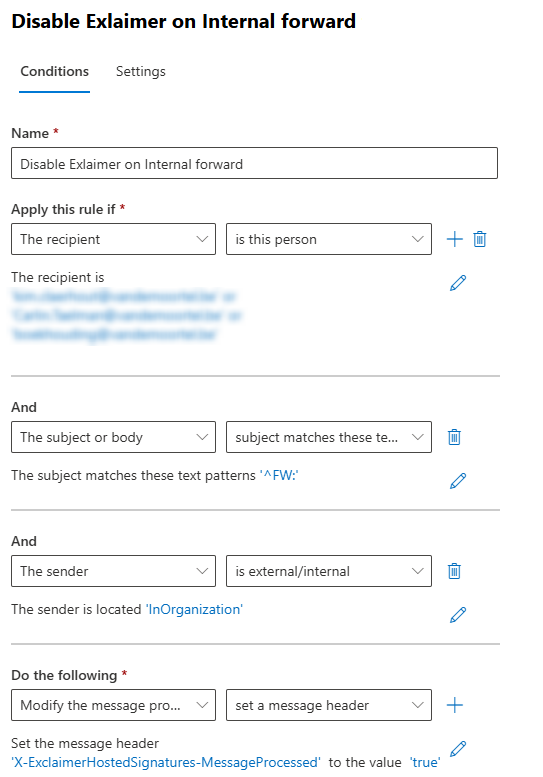
- Configure:
- Apply this rule if: recipient matches the impacted mailboxes
- And if: subject matches the regex
^FW:(i.e. starts with “FW:”) - And if: sender is InOrganization
- Then: add header
X-ExclaimerHostedSignatures-MessageProcessed=true
This header prevents Exclaimer from re-processing the message and appending its signature.
As mentioned before, Exlaimer is working on a permanent fix. For now we are stuck with these two workarounds. There’s also an active Reddit discussion: Reddit – Outlook Classic plain text forward causing blank body